

ultracode and Dynamic Workflows
Setting Claude Code’s effort to ultracode — one notch above xhigh, to the right of max in the UI — enables automatic orchestration via the workflow runtime. This mechanism is best known for powering Bun’s large-scale rewrite from Zig to Rust1. Claude Code’s built-in /deep-research also runs on the same workflow internally.
According to the documentation, up to 16 agents launch in parallel once this kicks in, each with its own independent session. When Claude Code decides from the user’s instruction that “this is worth turning into a workflow,” the runtime takes over2.
At the heart of this ultracode orchestration is the dynamic workflow. You can inspect the list of workflows that ran in the background via /workflows in the UI. The desktop and CLI versions differ slightly in presentation, but the CLI shows more detail.

A workflow does not let the model decide the execution order of subagents through reasoning at run time; instead, it follows a pre-generated JavaScript script. It resembles Cloudflare’s CodeMode, which bundles multi-step tool calls into pre-generated TypeScript and executes them outside of inference — but the goal here is not token reduction.
Anthropic contrasted workflows and agents in a 2024 article3. There, an agent is described as one where the model “dynamically directs its own process and tool use.” A workflow, by contrast, “is orchestrated through a pre-defined code path” and is described as static. The name “dynamic workflow” likely comes from that contrast: the code-generation phase is dynamic. Once generated, however, the workflow itself runs as a static code path, just as in the original definition.
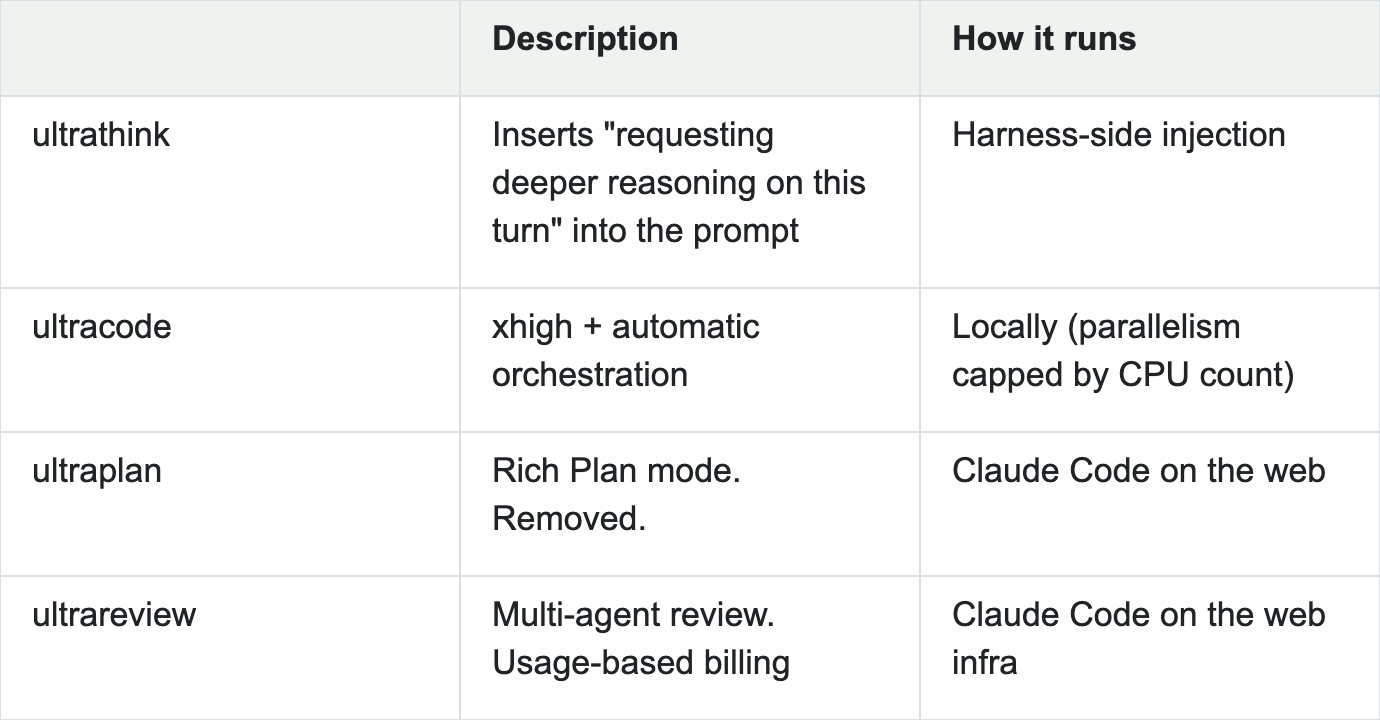
Anthropic tends to name its top-tier features “ultra-__.” Some of them scale by offloading what used to run locally to the cloud. ultraplan (now removed) let you operate a rich Plan mode in the browser, and ultrareview (/code-review ultra) runs multi-agent code review on cloud infrastructure.
I initially assumed ultracode also ran in the cloud, but it does not. It runs subagents in parallel locally. On a modest machine like my Mac mini, hitting the parallelism limit consumes enough memory to freeze the OS window manager (quite disruptive). Running many sessions in parallel also drives up token costs in proportion.
The Generated Code Is Readable and Editable
A dynamic workflow’s internally generated JavaScript can be read afterward. After running a workflow with ultracode, files are automatically saved under ~/.claude/projects/. Under the hood, it’s just a JavaScript file. Press s to export it under the project’s .claude/ directory. Once exported, it becomes available as a slash command, and you can carry it out of the project as a reproducible workflow. Just prompt Claude Code with “run this file as a workflow” and it will follow the script.
In other words, you can write it yourself. “Handwriting” today mostly means having an agent write it for you. The documentation does not spell out the workflow APIs in detail, but reading exported files reveals what is available.
The most important is the agent function agent(..., {schema}). Subagents start from here. Whether you call agent functions in parallel or serially is expressed directly in JavaScript syntax. For direct execution, simply line up await agent() calls.
parallel() runs agent calls in parallel and waits for all of them before proceeding. It fits cases where you want to wait for all of them and bring them together in the next step — when the next step depends on all results. If you have used JavaScript Promises or async patterns, this is immediately intuitive.
pipeline(), on the other hand, pipes call results through stages. Each item flows independently without waiting, proceeding asynchronously after invocation. It avoids waiting when it is fine to produce results independently.
const results = await parallel([
  () => agent('investigate A'),
  () => agent('investigate B'),
  () => agent('investigate C'),
])
// At this point A, B, and C are all done

const results = await pipeline(
  ['x.ts', 'y.ts', 'z.ts'],
  file  => agent(`investigate ${file}`),   // stage 1
  found => agent(`fix ${found}`),          // stage 2
)
// While x is in stage 2, y is still in stage 1
Schemas let you turn responses into typed return values by passing a schema as an argument to the agent. You use this to build logic. It structures subagent call results, and because the defined schema becomes the agent’s return value, you can implement branching and loops with filter and while.
There are constraints, though: even though it’s JavaScript, you can’t use arbitrary APIs. For example, WebAssembly does not work. fetch, require, process, crypto, Bun-specific APIs, WebAssembly, and import() all cause the script to abort before execution. In short, you can think of it as an ECMAScript-compatible DSL that cannot call host APIs — like the Lua scripting layer bundled with game engines. Non-deterministic values like Date.now() and Math.random are also disallowed.
This restriction exists for memoization — caching results by matching prompts. Calling Date.now() or Math.random returns an error like:
Date.now() / new Date() are unavailable in workflow scripts (breaks resume). Math.random() is unavailable in workflow scripts (breaks resume). For N independent samples, include the index in the agent label or prompt.
Call results are hashed from the prompt and arguments to form a cache key. That key is used when resuming an interrupted run. I verified it like this. First, I called agent() inside a workflow and resumed with the same runId; the return value changed but no new session was created. Next, I modified the prompt and called with the same runId; a new session was created. Auditing the generated journal.jsonl showed the first and second keys matched, while the third differed.
This JavaScript runs on Bun’s JavaScriptCore (JSC) — the engine that powers Claude Code. You can observe the difference between Node.js and Bun by triggering a property-access error:
$ node -e 'try{const o={};o.nope()}catch(e){console.log("node:", e.message)}'
node: o.nope is not a function
$ bun  -e 'try{const o={};o.nope()}catch(e){console.log("bun :", e.message)}'
bun : ({}).nope is not a function. (In '({}).nope()', '({}).nope' is undefined)
Files are saved as follows:
~/.claude/projects/<project>/<sessionId>/
├── workflows/
│   └── wf_<runId>.json                     1–2.5KB  one file per run
└── subagents/workflows/wf_<runId>/
    ├── journal.jsonl                       556B      two lines appended per call
    ├── agent-<agentId>.jsonl               ~31KB    conversation log of executed agents
    └── agent-<agentId>.meta.json           48B
A Loop Workflow for External Codex Review
Using this mechanism, I turned a task I regularly perform into a semi-fixed JavaScript workflow instead of a prompt-based one. That is /red-pen-loop4. This workflow delegates code review to an external Codex.
The JavaScript API for workflows lets you declare schemas for the types that subagents exchange. On the Codex side, an external command invocation returns JSON in a fixed shape. This lets a subagent invoke Codex via the CLI and map its response back to the schema. The caller receives information in the expected type and drops it straight into JavaScript logic.
Writing Logic with Schemas
Because the returned schema is guaranteed, you can write loops and conditionals as a workflow. For example, you can receive results and loop over agent calls like this:
const targets = findings.filter(f => f.priority <= THRESHOLD)
What used to be described in prompts as “if this, do that” becomes declarative code and executes deterministically. That is the interesting part. Personally, it feels like a swing back to the days when I hand-wrote fine-grained behaviors in LangChain.
Trying It Out
I invoked RedPen via a prompt and ran an experiment that repeats pull-request reviews until no priority 1 findings remain. It iterated through commits and fixes on its own. What previously required two or three stages of human intervention could be turned into a workflow.
What I learned from running it is that sessions launched in the background will ask for permission, so you need to be in auto mode for it to run smoothly. Haiku is not eligible, so you must run it with Sonnet, Opus, or above. Strictly speaking --dangerously-skip-permissions (yolo) also works, but I don’t use it per security policy.
Column: ultrathink
As a side note, the first ultra feature to gain wide adoption was ultrathink. At the time it was a hidden shortcut that set the model’s reasoning budget — generating more thinking tokens to think deeper. Claude Code later made thinking-level control explicit via /effort. Today’s ultrathink simply inserts “requesting deeper reasoning on this turn” for one turn and leaves the rest to the model. It was actually removed once and then revived with this specification. It no longer triggers on translated keywords in other languages, as it once did. Old posts — and the AIs that quote them — still claim that shouting “deepthink! think harder” makes the model smarter, a neat little case study in how myths spread.
Closing
Anthropic describes workflows not as something users write freely, but as something generated automatically via agents. In other words, handwriting is not officially recommended. The workflow API details are not documented either. Given the need to maintain compatibility and ship experimental features quickly — including frequent updates to cloud infrastructure — that trade-off makes sense.
For simple workflows, generating code on the fly each time and executing it is fine. You can also reproduce that repeatedly with a prompt-based skill. And workflows emit code locally after execution. So the difference comes down to a choice: generate in the moment, or load static code that was executed in the past.
Running this JavaScript DSL as a script is highly extensible. It minimizes variance from inference and lets you control behavior as intended, and you can share code with others. The larger the work, the greater the benefit of designing directly through code. At that point, the ability to read workflow code, understand how it behaves, and patch it becomes valuable.
Try it: run ultracode once, press s to export the workflow, and read the generated file. That’s the fastest way to see whether handwriting is worth it for your task.